
Prerequisites
-
Access to Portfolio Finder
-
(Optional) CRM connection with appropriate permissions
Step 1 - Run a Search and Save It
-
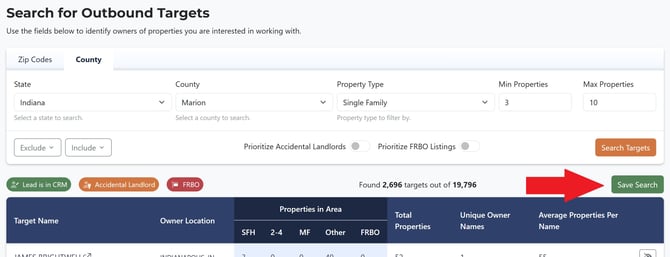
Open Portfolio Finder and set your filters (market, property type, minimum quantity, etc.).
-
Click Save Search and give it a clear name.
Step 2 - Open Your Saved Searches
-
In the Portfolio Finder menu, click Saved Searches.
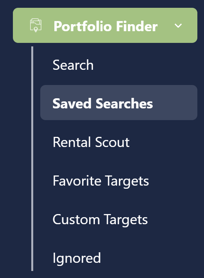
You’ll see your saved searches list. At the top is the AutoPilot panel.

Step 3 - Enable AutoPilot
-
In the AutoPilot section, select the saved search you want to enroll.
-
In addition to email delivery, leads can be placed directly into your CRM. Toggle Add to CRM to enable this function, and choose the CRM destination options.
- Lastly, click Enable to activate AutoPilot
What Autopilot does each week
-
Prioritizes FRBOs, accidental landlords, and recent acquisitions
-
Skip traces and verifies emails to minimize bounces
-
Enriches contacts with additional deliverable emails and LinkedIn/social when available
-
Delivers a CSV (up to 25 leads) every Monday morning.
Step 4 - Choose Email Recipients
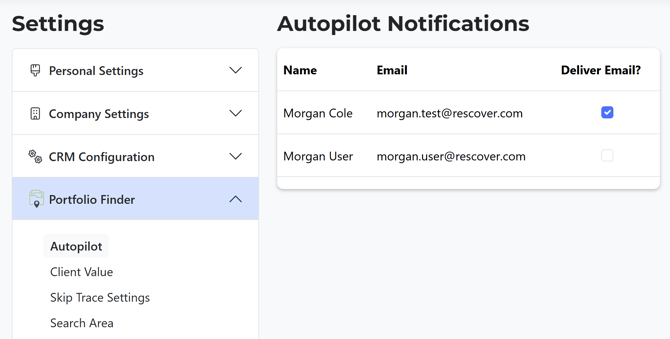
Decide who on your team receives the Monday email + CSV:
-
Go to Settings → Portfolio Finder → Autopilot.
-
Add or remove recipients.
FAQs
Does this cost extra?
No. Autopilot is included with Portfolio Finder.
Can I run multiple Autopilots?
At launch, one saved search can be enrolled at a time.
Why are some weeks under 25?
We only deliver validated contacts. Some markets/filters yield fewer in a given week.
My CRM didn’t receive the leads - what now?
Check your CRM connection in Settings, then re-enable. You’ll still have the CSV in your email.
Best Practices
-
Keep a FRBO-focused saved search for higher near-term intent.
-
Turn on CRM sync so drips/sequences start automatically.
-
Add multiple recipients so marketing sees the CSV too.
-
Review bounce/response metrics in your CRM and refine messaging over time.